
@hamiltonianflow asked:
Ms. Mlem, I would like to ask: hypothetically, if one wanted to learn how to avoid ninateka's drm, how one would go about doing that?
This is an area I’ve barely dipped into, but basically what you’re searching for is “Encrypted Media Extensions”, “Content Decryption Modules” and “Widevine DRM” (the specific CDM used in case of Chrome and Firefox, there are others).
You need N_m3u8DL-RE, mp4decrypt, mkvmerge (or ffmpeg) and CDRM-Project. This post is going to be long, technical, the procedure is complicated, and may be difficult to generalize to other services.
Also it’s very likely there is a simpler or better way of doing this.
DRM
Fundamentally the purpose of DRM is copy protection and guarding the publishers’ precious copyrights, but in the wider scope of things, it is an instance of rent seeking behaviour.
My wider stance on intellectual property is generally known, so let’s move on.
The usual approach is using cryptography in order to encrypt the media. Then, in order to actually access the media (view the movie, read the ebook, play the song), you then need the key. Now, the problem for the rent seekers intellectual property holders is that the same device that accesses the media needs the key in order to be able to play it, and therefore if we are able to perform the same steps as the device does, and then “leak” the key, we can break DRM. As a result, the practical implementation of DRM try to make it as obnoxious as possible, and possibly uses hardware features that are designed to make it hard to extract the key from.
In short, it’s a constant conflict between them building the tallest wall, and us building the tallest ladder.
Internet streaming
After the introduction of native video and audio playback in HTML5, an internet browser is capable of playing some multimedia formats without needing to install an external program (like Adobe Flash Player), so basically anyone can just put up a file, point a <video> tag at the URL and let it play. This however, introduces some problems because people sometimes want to skip to in the middle of the video without needing to download, say, 40 minutes of footage to be able to get to the 40th minute. Also sometimes people are on their phones with a 3G connection and are not able to stream your 1080p video, but they would be willing to watch it even in shit quality, if it means they get to see it at all. Also you know, data caps.
This is where adaptive streaming comes in, like DASH (Dynamic Adaptive Streaming over HTTP) or HLS (HTTP Live Streaming).
While they’re both different, the general principle of how they work is the same. Separate the movie into video (for different resolutions or encodings) and audio streams (say, for different languages or audiodescription versions). Divide the streams into tiny chunks. The playlist then describes where to get each chunk of a stream, given that we know the timestamp, and which stream we want.
yt-dlp can do the job of downloading each chunk and merging them into a single stream, but DRM decryption is by design out of its scope and bails out when detects encrypted streams.
Command Line 101
A command line is something which Linux users use to scare wider Tumblr population. Or so I heard.
Unfortunately for them
- making a GUI application with a
niceinterface is 10-100x more effort, and most open source projects are woefully understaffed (usually done by a single person, as opposed to average software company which has backend developers, frontend developers, technical writers, testers, QA department, product owners, technical analysts, documentation writers, UI/UX designers and they are all employed full time) - Windows also has a command line (in fact, two: cmd.exe and PowerShell)
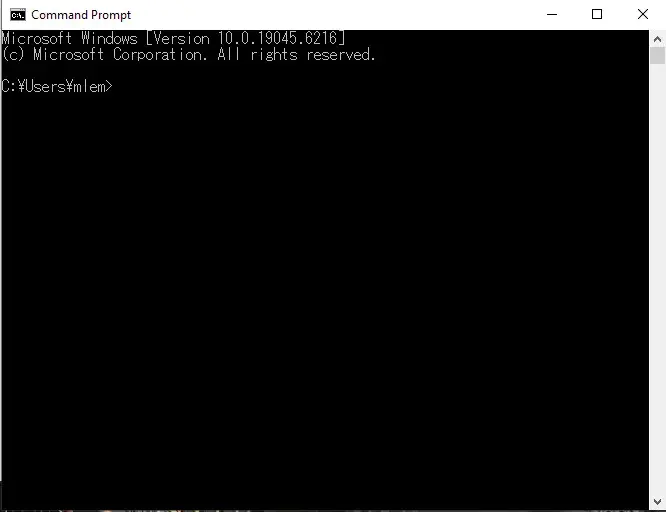
A command line interpreter takes in a user-typed command, runs it, and then produces a result to the user. You can type in a command and then press Enter to run it. When the interpreter is ready to accept new command, it will display the current directory, and then a character like “>”, “$”, or “#”, depending on context. The current directory is where the user is operating on. Relative paths like “../directory” are resolved relative to current directory. Relative path “../directory” means “go to a parent directory, and then from there, to a directory named “directory”. A command has a form of PROGRAM PARAMETER1 PARAMETER2 PARAMETER3. On Windows, you can change to a different directory with cd /d C:\your\path\goes\here. Linux doesn’t have a concept of drive letters so you don’t need a /d to change to a different drive like on Windows’s cmd.exe.
“okay so I want my own program to be runnable with myprogram C:\myfile, how do I make it so I can do it.” You need to set the PATH environment variable (Windows guide, Linux guide) which lists all the directories in which programs runnable by just typing the name of the program can be run from. Put your programs in your own directory, and then add the path to that directory to PATH environment variable.
“okay so I did it. still nothing.” the PATH environment variable is loaded at the interpreter startup. Close it and start a new interpreter.
“mlem, why is your current directory displayed with yen symbols and not backslashes” Japanese locale.
“why did I need this half-assed explanation” so you can put all the programs in the directory and run them as needed from the command line.
Ninateka
Quoting the “About us” page of Ninateka (translation mine)
Ninateka is a video-on-demand service of National Cinematheque – Audiovisual Institute that offers narrative films, documentary films, animated films, conference recordings, meetings with authors, lectures, performances, music shows, audiobooks and audio dramas. It’s over 4000 audio and video files, which consists the record of Polish culture and history of movie art. Access does not require log in. All materials shared on the site are payment-free and completely ad-free. It’s here where you can see the collection of FINA [National Cinematheque Audiovisual Institute] after digitalization and digital reconstruction.
What do we have to do
- Find the underlying stream
- Get the key
- Download it the chunks and merge them
- Decrypt the streams
- Merge the streams into a single container file
Finding the underlying stream
In the past, when you wanted to see how a web page displayed a specific element of the web page, or how did the author made it so snowflakes were falling from cursor down below, you right clicked it and selected “view page source”. Nowadays the web pages can be interactive and JavaScript can download data from the server, and the tools involved are way more complex. Pretty much every browser offers Developer Tools, accessible either through the user interface, or by pressing F12. They have slight differences between the browsers, but for the most part they’re pretty similar, as they have been directly or indirectly inspired by a 2006 Firefox extension named Firebug
In this case we want to navigate to the website, go to developer tools and select the Network tab. This displays all the relevant HTTP requests that the browser had to issue so far.
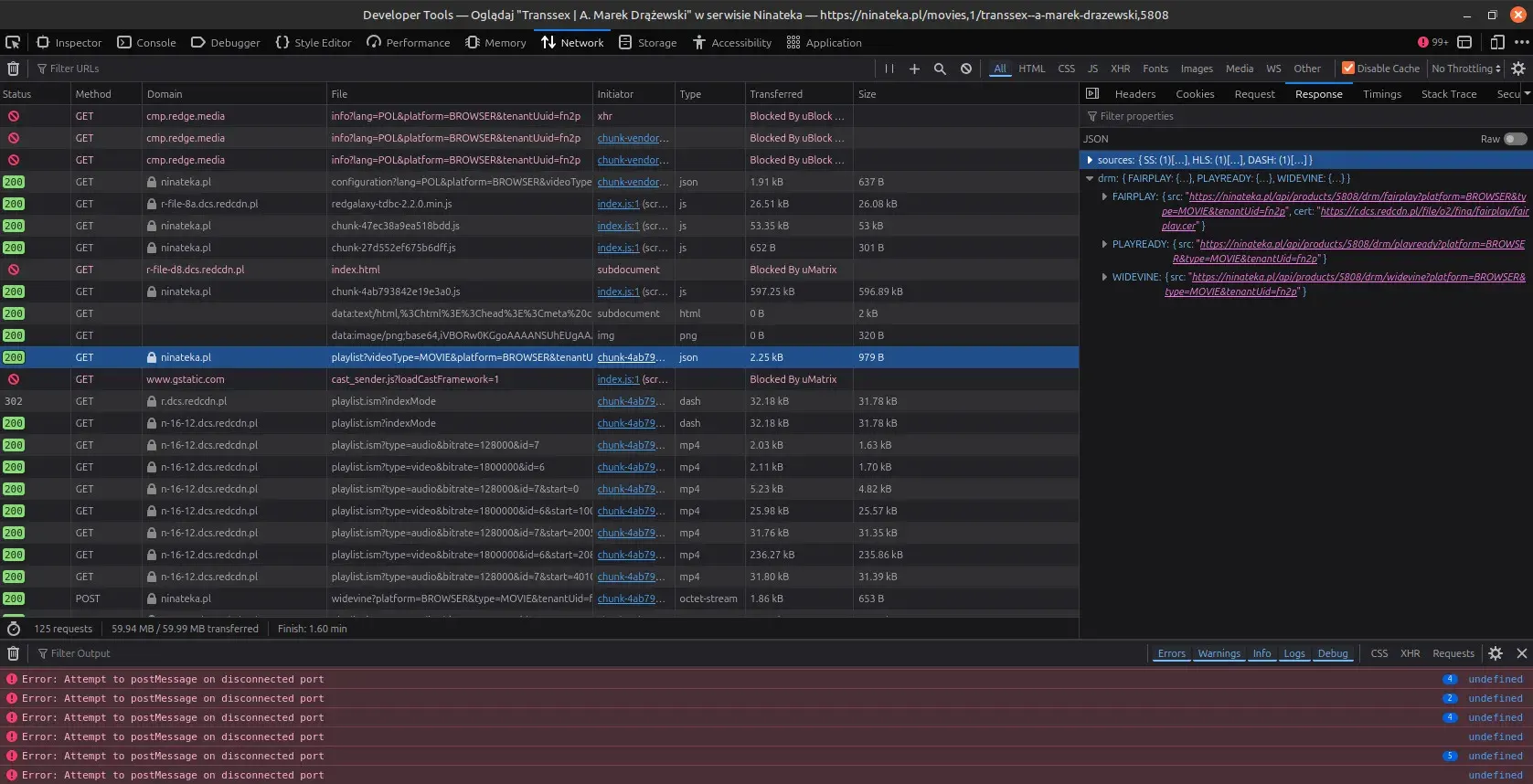
Here we can see a browser request pertaining to different stream methods: Smooth Streaming, DASH and HLS, and also handling three Content Decryption Modules: FairPlay, PlayReady, and Widevine. Take note of the URLs involved there, so you can recognize them later on.
Looking at two requests done below, we can see a request with type “dash”. This is the actual stream playlist.
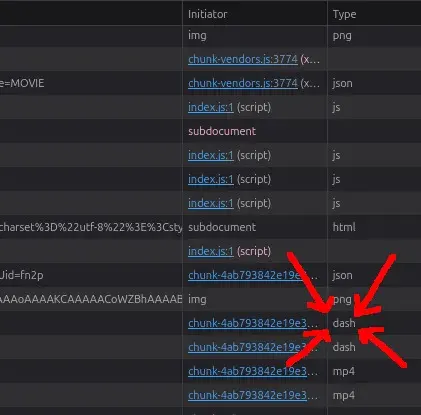
Let’s copy the URL of it.
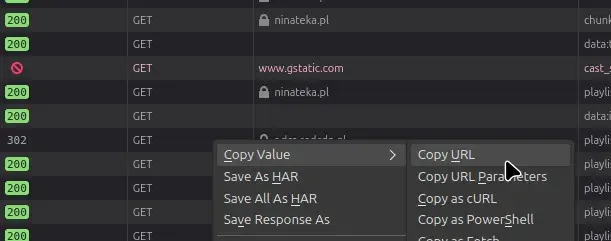
We also want to copy the entire request from which the web video player does in order to get the key that deciphers the streams.
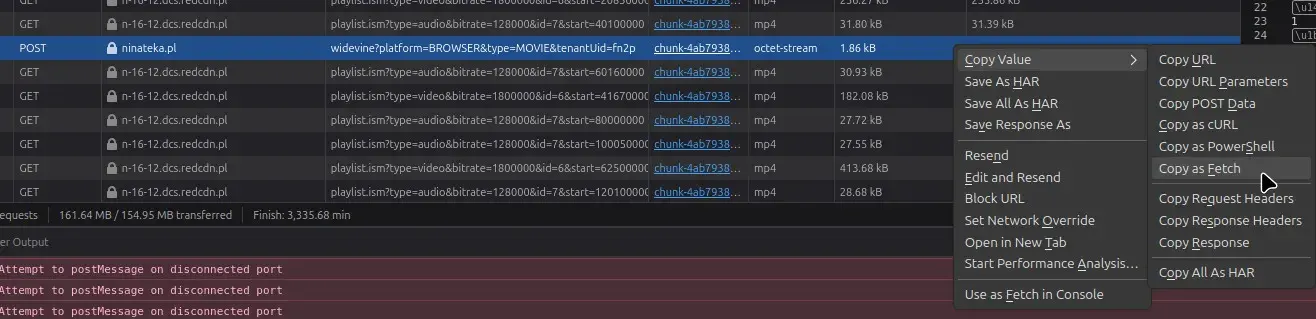
You can recognize “widevine” in the URL, as it appeared earlier on, in the first screenshot, in the response. Right click -> Copy Value -> Copy as Fetch.
(“fetch” is a name of a JavaScript function that sends a HTTP request. The important part is that it has all the information needed to “replay” the request later on.)
Get the key
CDRM-Project is capable of extracting a key to decrypt the stream (for some sites, at least). It also happens to provide a way to extract all the relevant DRM information given a “fetch” call, which is what we copied in step 1.
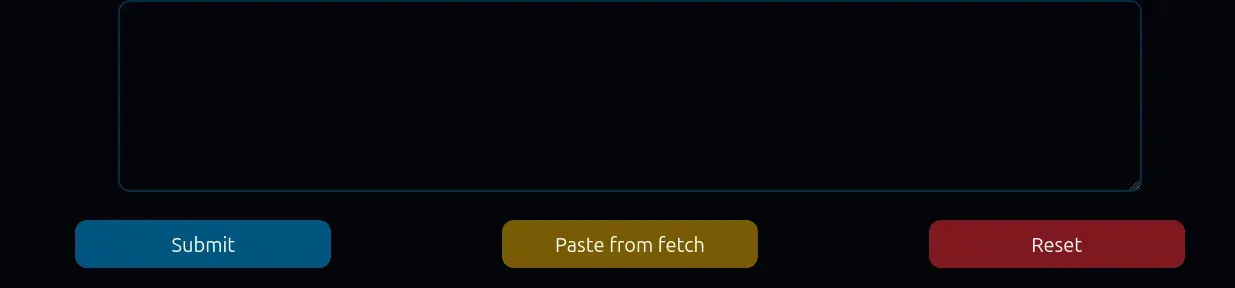
Click “Paste from fetch”. A dropdown with a single option “Paste” will appear. Click it after a few seconds when it becomes selectable.
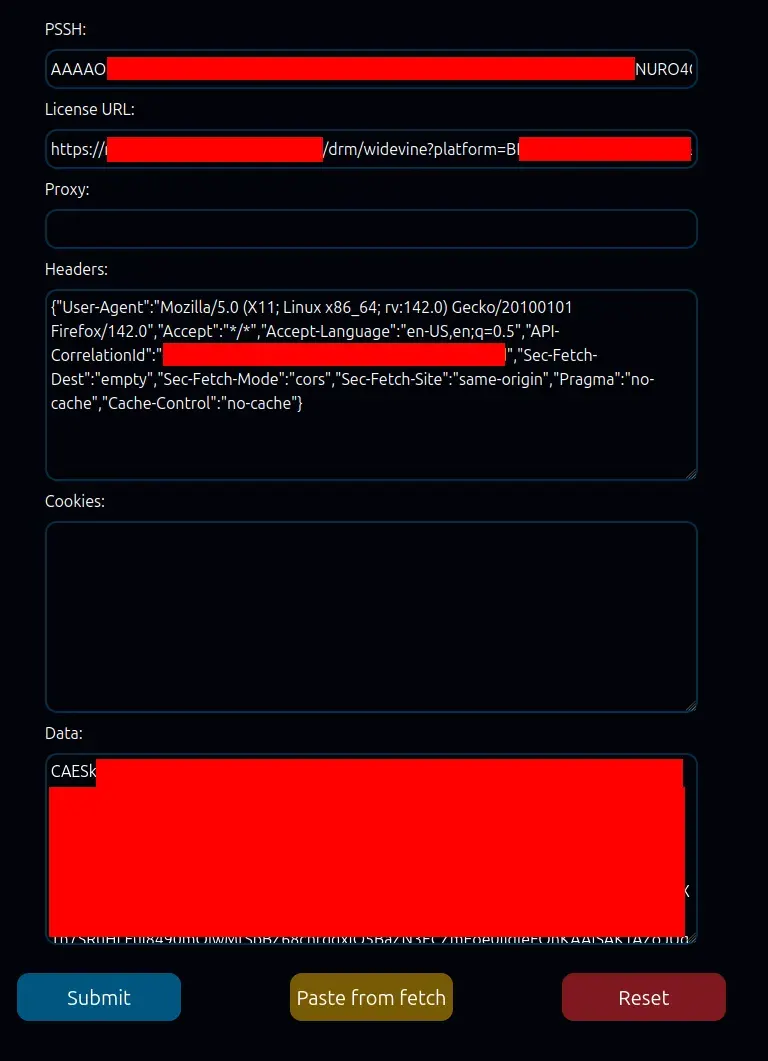
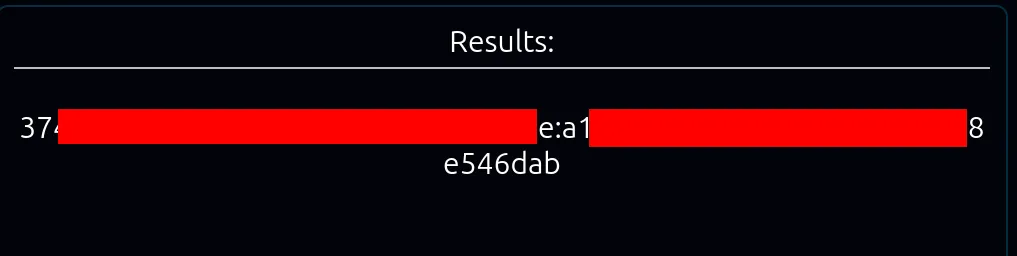
Click submit. If sucessful, you will get a key in the form of two hexadecimal numbers separated by a colon.
Download the chunks and merge them
We use the N_m3u8DL-RE commandline application. We can do steps 3-5 in a single execution of the application, but we can also do them separately, if we want to do extra processing in between (like adding in extra subtitles in step 5)
Upon running it with the URL we got in step 1, we are then asked to select which streams we want.
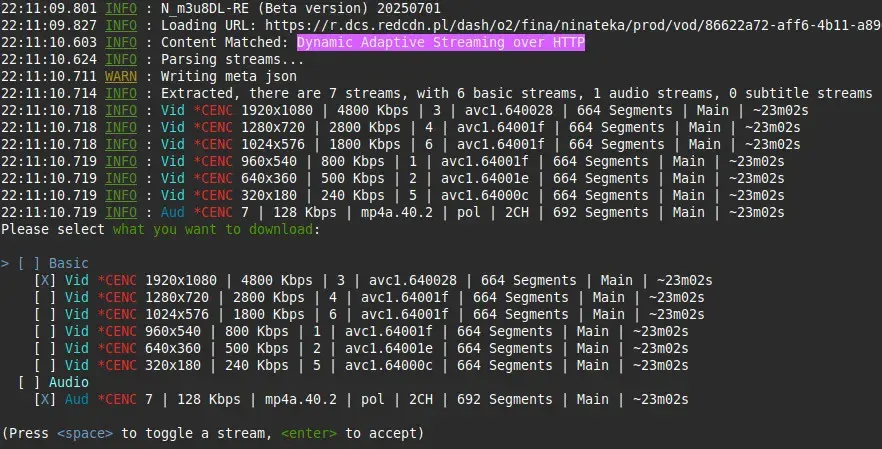
In theory we could download them all if we wanted, in practice we only want the one of the highest quality, and this is the one that is selected by default. We can press Enter to proceed. Otherwise we can move the “>” cursor up and down with “Up” and “Down” arrows, and select each stream with a space.
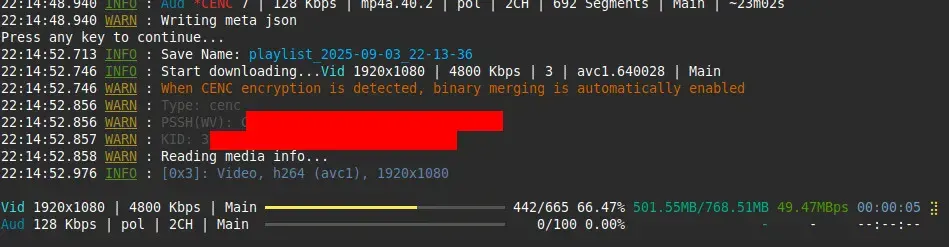
By default it saves those under the file name derived from the address and current time/date, which are most likely not very useful. We can use the --save-name option to name them with something else.
Because there were two streams, we are going to get two files from it. Also because we didn’t provide the key, both of those streams are still encrypted.
Decrypt the streams
mp4decrypt can decrypt the streams, either by running it manually, or making N_m3u8DL-RE run it.
We can do the latter with the --key THE-KEY-FROM-STEP-2 option.
If you get an error like this, it means N_m3u8DL-RE can’t find mp4decrypt. Check your setup.

00:06:43.658 INFO : N_m3u8DL-RE (Beta version) 20250701
00:06:43.691 ERROR: System.IO.FileNotFoundException: mp4decrypt not found, please download at: https://www.bento4.com/downloads/
   at N_m3u8DL_RE.Program.DoWorkAsync(MyOption option) in /home/milleniumbug/dokumenty/PROJEKTY/NotMine/N_m3u8DL-RE/src/N_m3u8DL-RE/Program.cs:line 183
   at N_m3u8DL_RE.CommandLine.CommandInvoker.<>c__DisplayClass83_0.<<InvokeArgs>b__0>d.MoveNext() in /home/milleniumbug/dokumenty/PROJEKTY/NotMine/N_m3u8DL-RE/src/N_m3u8DL-RE/CommandLine/CommandInvoker.cs:line 654
--- End of stack trace from previous location ---
   at System.CommandLine.Invocation.AnonymousCommandHandler.InvokeAsync(InvocationContext context)
   at System.CommandLine.Invocation.InvocationPipeline.<>c__DisplayClass4_0.<<BuildInvocationChain>b__0>d.MoveNext()
--- End of stack trace from previous location ---
   at System.CommandLine.Builder.CommandLineBuilderExtensions.<>c__DisplayClass17_0.<<UseParseErrorReporting>b__0>d.MoveNext()
--- End of stack trace from previous location ---
   at System.CommandLine.Builder.CommandLineBuilderExtensions.<>c__DisplayClass12_0.<<UseHelp>b__0>d.MoveNext()
--- End of stack trace from previous location ---
   at System.CommandLine.Builder.CommandLineBuilderExtensions.<>c__DisplayClass22_0.<<UseVersionOption>b__0>d.MoveNext()
--- End of stack trace from previous location ---
   at System.CommandLine.Builder.CommandLineBuilderExtensions.<>c__DisplayClass19_0.<<UseTypoCorrections>b__0>d.MoveNext()
--- End of stack trace from previous location ---
   at System.CommandLine.Builder.CommandLineBuilderExtensions.<>c.<<UseSuggestDirective>b__18_0>d.MoveNext()
--- End of stack trace from previous location ---
   at System.CommandLine.Builder.CommandLineBuilderExtensions.<>c__DisplayClass16_0.<<UseParseDirective>b__0>d.MoveNext()
--- End of stack trace from previous location ---
   at System.CommandLine.Builder.CommandLineBuilderExtensions.<>c.<<RegisterWithDotnetSuggest>b__5_0>d.MoveNext()
--- End of stack trace from previous location ---
   at System.CommandLine.Builder.CommandLineBuilderExtensions.<>c__DisplayClass8_0.<<UseExceptionHandler>b__0>d.MoveNext()
Merge the streams into a single container file
mkvmerge can merge (mux) video, audio and subtitle tracks into a single .mkv container file.
Again, we can make N_m3u8DL do it too, with --mux-after-done format=mkv:muxer=mkvmerge
Or we can run mkvmerge manually with mkvmerge -o FILENAME.mkv FILENAME.mp4 FILENAME.m4a …
Steps 3-5 together
N\_m3u8DL-RE URL-FROM-STEP-1 --save-name FILENAME --key KEY-FROM-STEP-2 --mux-after-done format=mkv:muxer=mkvmerge
Substitute URL-FROM-STEP-1, FILENAME, KEY-FROM-STEP-2 with the appropriate values.